Guide · tested 1 November 2026
TikTok Creative Center Top Ads: how to use it without an account
Without an account, TikTok Creative Center Top Ads shows filters and ad cards with likes, CTR percentile, budget level, objective and industry. On 1 November 2026 the US view showed only 4 ads, and 4 again after an industry filter; View More and See analytics required a login.
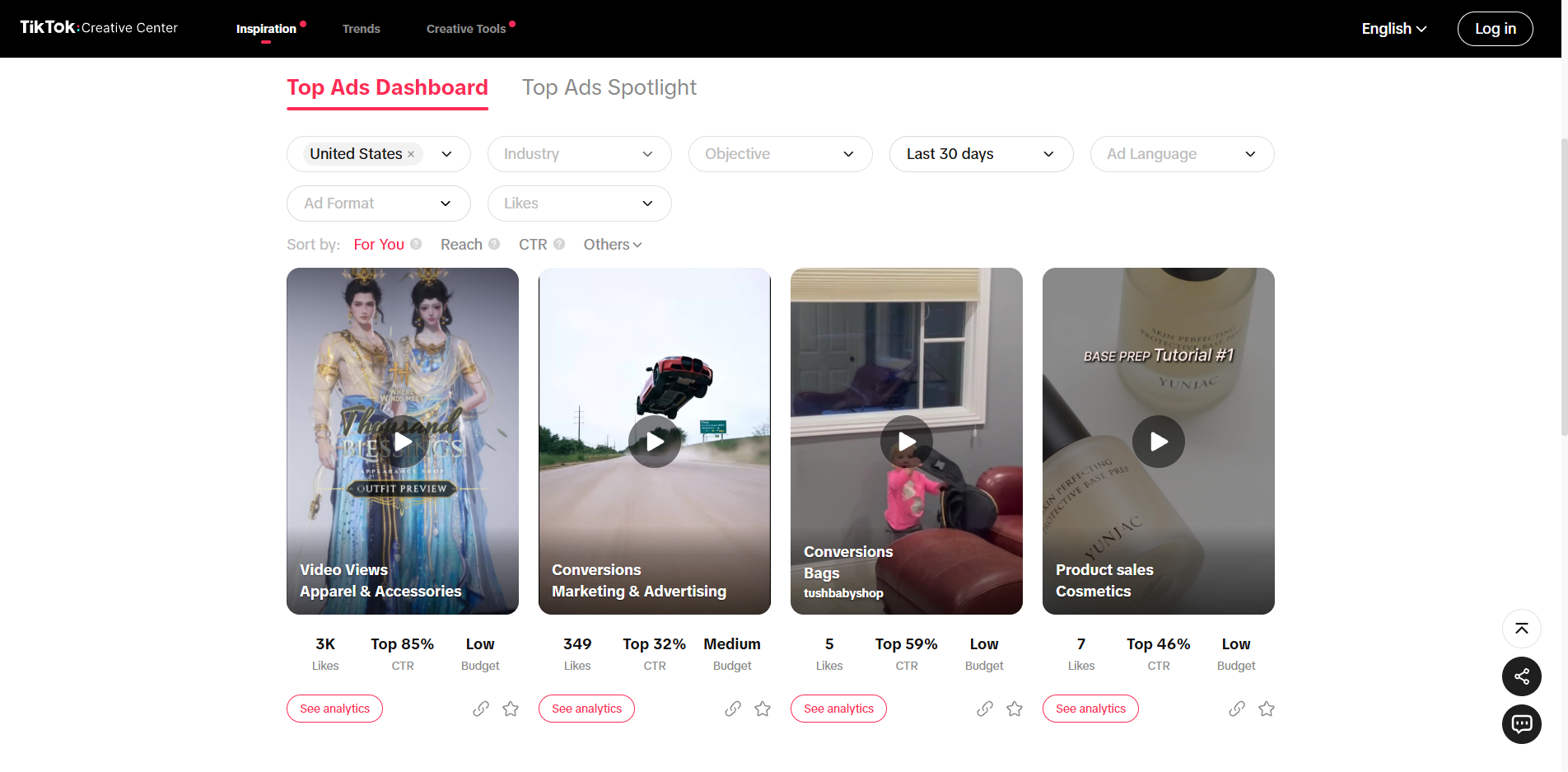
The 4 ads visible without login on the Top Ads Dashboard, region United States, Last 30 days, default sort For You, 1 November 2026.
| Objective | Industry | Likes | CTR | Budget | Advertiser shown |
|---|---|---|---|---|---|
| Video Views | Apparel & Accessories | 3K | Top 85% | Low | no |
| Conversions | Marketing & Advertising | 349 | Top 32% | Medium | no |
| Conversions | Bags | 5 | Top 59% | Low | tushbabyshop |
| Product sales | Cosmetics | 7 | Top 46% | Low | no |
What the TikTok Creative Center Top Ads page is
Creative Center is TikTok's own site for advertisers; its header carries three sections, Inspiration, Trends and Creative Tools, and Top Ads sits under Inspiration. It lists ads that TikTok ranks as top performers for a chosen region and period, as video cards. It is a free page from TikTok itself, not a third-party tool, which is why it needs no subscription. What it shows is limited, as the steps below make clear, and the logged-out view shows much less than the full page.
Step 1: open TikTok Creative Center Top Ads
Go to ads.tiktok.com/business/creativecenter/inspiration/topads/pc/en. No account is needed to see the page: the header shows a Log in button, and the Top Ads Dashboard loads with filters and ads. A second tab, Top Ads Spotlight, sits next to it; this guide covers the Dashboard.
Step 2: choose a region and a period
The Region filter comes first. We opened the page for the United States, and the list includes countries such as Argentina, Australia, Brazil, Canada, Colombia, France, Germany, Indonesia, Italy, Japan, Malaysia, Mexico, the Netherlands and Pakistan. The Period filter sat at Last 30 days when we opened it. Set both before anything else: they decide which ads you see, and the page address carries them (period=30 and region=US).
Step 3: narrow by industry, objective and the other filters
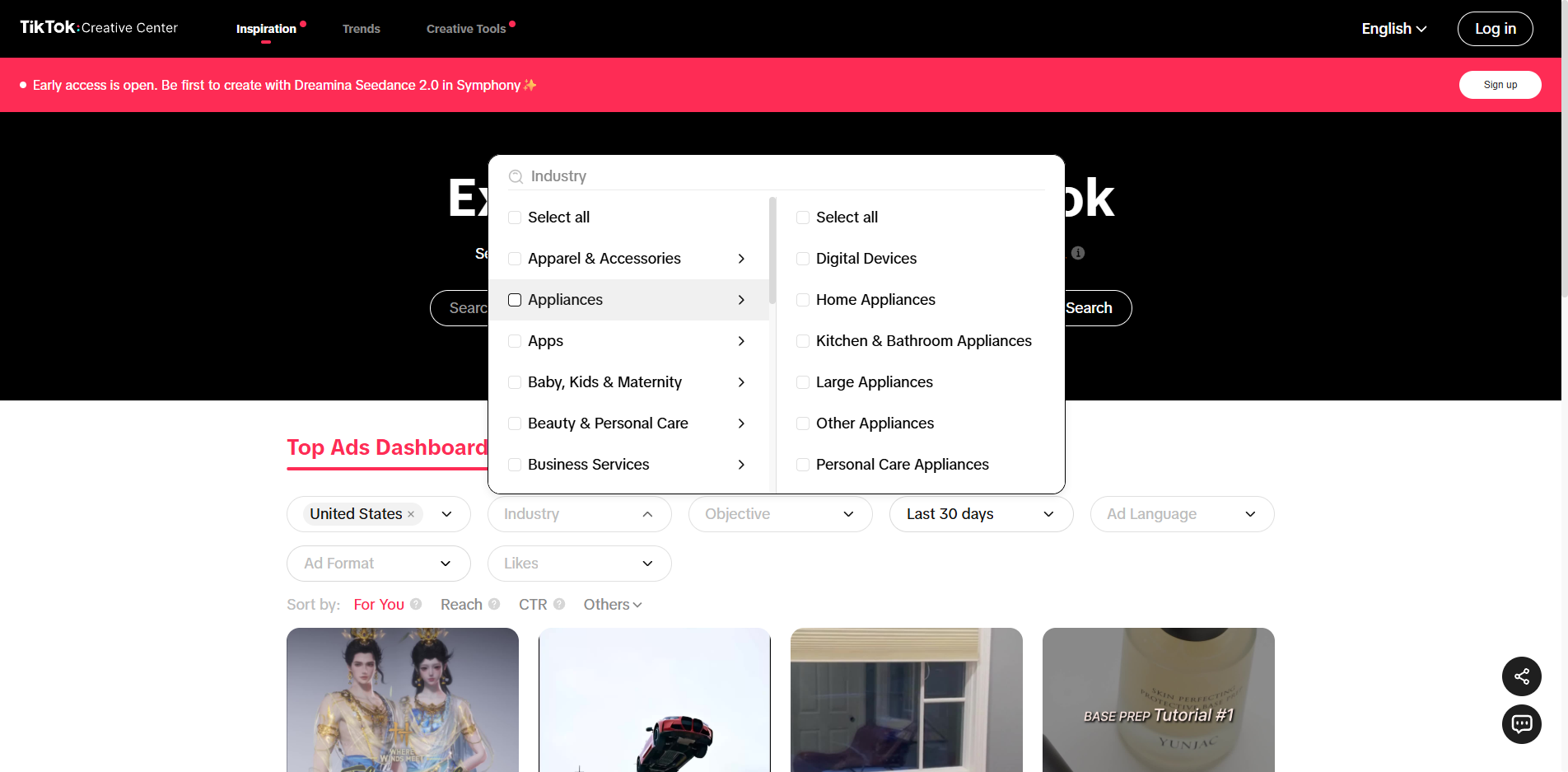
The same bar offers Industry, Objective, Ad Language, Ad Format and Likes. Start with Industry, because the card shows it and it is the quickest way to move from a mixed feed to your own category. The list has two levels: each industry, such as Appliances or Beauty & Personal Care, opens its own sub-industries, so you can tick a whole industry or one narrow part of it. Then add Objective if you care about, say, Conversions rather than Video Views. Sorting sits under the bar (For You, Reach, CTR, Others); we left it on For You and did not test the other three.
The choice goes into the page address (Beauty & Personal Care added industry=14), so a filtered view can be bookmarked and reopened.
What a filter changes when you are logged out
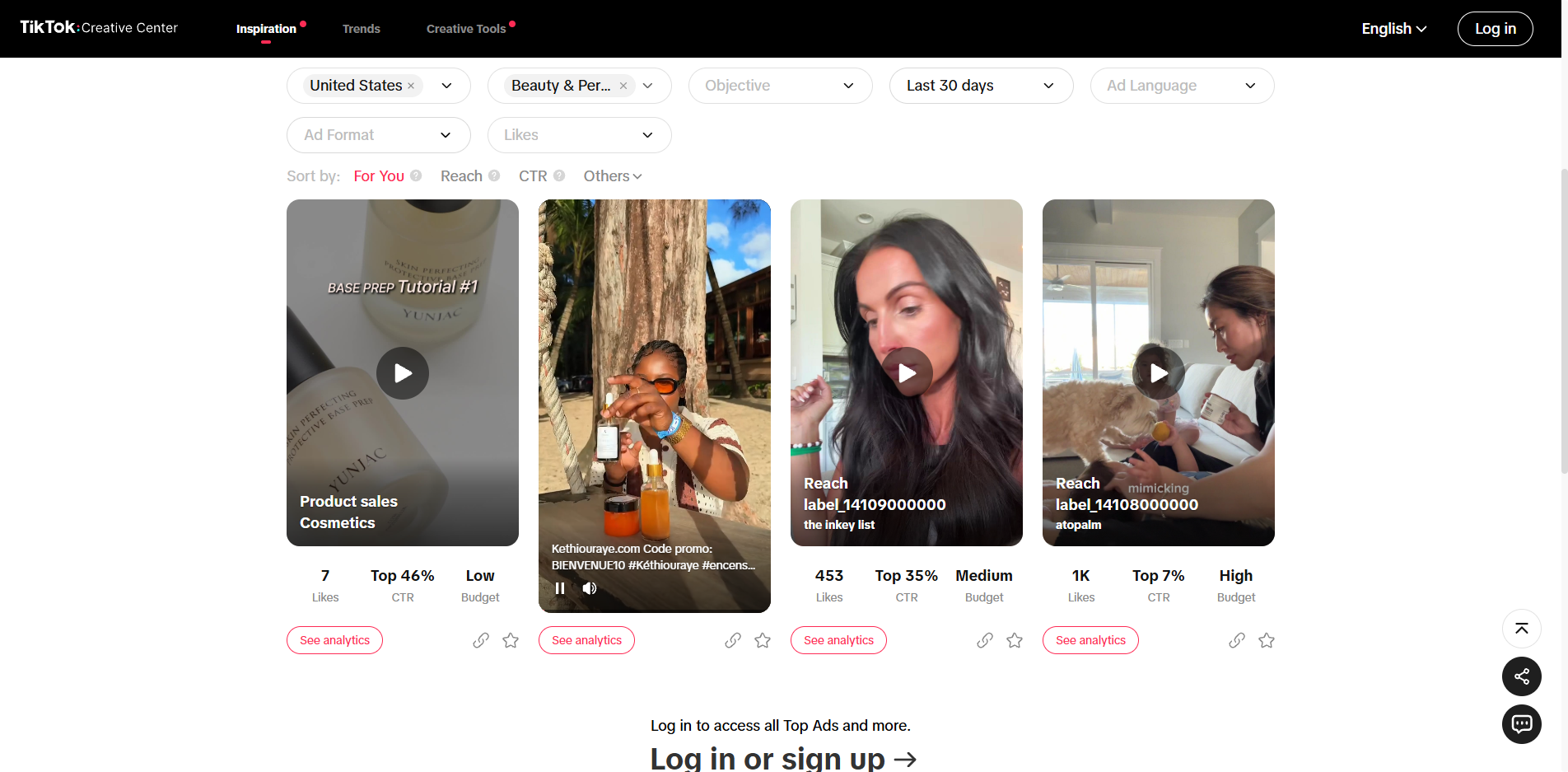
We ticked Beauty & Personal Care for the United States, Last 30 days. The feed changed, but its size did not: again four cards, with the login prompt directly under them. Only one of the four, a Cosmetics ad with 7 likes, had also been in the unfiltered view.
The four read: Product sales in Cosmetics, 7 likes, Top 46%, Low budget; a Kethiouraye ad with a French caption and a promo code, 67 likes, Top 62%, Low; a Reach ad from the inkey list, 453 likes, Top 35%, Medium; and a Reach ad from atopalm, 1K likes, Top 7%, High. On the last two the industry line printed a raw code, label_14109000000 and label_14108000000, instead of a name. So a filter gives you a different four, not more than four, and the labels are not always readable.
Step 4: read an ad card
Each card shows the objective and industry over the video, then three numbers: Likes, a CTR percentile and a Budget level. In the unfiltered US view the four cards read: Video Views in Apparel & Accessories, 3K likes, Top 85%, Low; Conversions in Marketing & Advertising, 349, Top 32%, Medium; Conversions in Bags, 5, Top 59%, Low; Product sales in Cosmetics, 7, Top 46%, Low. Only one card, Bags, names an advertiser (tushbabyshop).
The card shows a percentile label; TikTok does not say what it is ranked against on this page. Top 32% sits closer to the top than Top 85%, and that is all the label tells you: there are no click or view counts. Likes do not track it: the first card has 3K likes and the weakest CTR label, the Bags card has 5 likes and a better one.
Industry labels need care. The Apparel & Accessories card shows two costumed characters, an outfit preview and the title Where Winds Meet, which looks like an ad for a game rather than clothing. In the Beauty view a French incense ad (Kethiouraye) appeared under Beauty & Personal Care. We did not ask TikTok how industries are assigned, but the labels look imprecise, so check the video before relying on one.
What sits behind a card: a second source
Without an account a card gives no dates, no landing page and no ad text beyond the caption. To see more, we looked up the four Beauty card ids (the number at the end of each See analytics address) in the Spytrend TikTok ad search on 1 November 2026. Two of the four were found; two were not.
The atopalm card (1K likes, Top 7%) is a creator video tagged #atopalmpartner about eczema, sending clicks to a product page on amazon.com, US only. The record lists first and last sighting both on 28 October 2026, so the ad was seen on one day; that does not tell us how long it ran. The Kethiouraye card was seen on 29 October 2026 in 15 countries at once, from Belgium and France to the US and Australia, which explains a French caption in a US view.
The two sources disagree on one point. The atopalm card shows the objective Reach; the record says traffic. We do not know why.
What is locked without an account, and how far to trust the sample
Without logging in we saw four ads in each view we opened, and View More displayed "Log in to access all Top Ads and more." See analytics is locked too: opening an ad's analytics address (we tried ad 7034241977936461826) redirected back to the dashboard. The Budget label shows only a level, Low, Medium or High, with no amounts. That is enough to see which objectives and industries appear and how an ad is framed; it is not enough to size a budget or copy a result.
In practice the logged-out page works for a quick look at one region and one industry, and for learning the layout before you decide whether an account is worth creating; it does not work as a research list. TikTok also warns that the ads shown are limited to those authorized by advertisers and may not reflect all top-performing auction ads, so read the cards as what advertisers allowed to be shown, not as everything that runs.
FAQ
Can I use TikTok Creative Center Top Ads without an account?
Yes, partly. On 1 November 2026 the Top Ads Dashboard opened without login, with region, industry, objective and other filters, and four ads with likes, CTR percentile and budget. View More and See analytics required a login.
What does Top 85% CTR mean on a TikTok Top Ads card?
It is a percentile label on the card. TikTok does not say what it is ranked against on this page, and the card shows no raw click counts. Top 32% sits closer to the top than Top 85%. On 1 November 2026 the four US cards showed Top 85%, Top 32%, Top 59% and Top 46%.
How many ads can you see in TikTok Top Ads without logging in?
Four. On 1 November 2026 the US view for the last 30 days showed four cards, and ticking Beauty & Personal Care replaced them with four others. The page then said "Log in to access all Top Ads and more."
Are TikTok Creative Center Top Ads all TikTok ads?
No. TikTok states that the ads displayed are limited to those authorized by advertisers and may not reflect all top-performing auction ads.
What can you filter in TikTok Top Ads?
Region, Industry (two levels: industries and sub-industries), Objective, Period (Last 30 days when we opened it), Ad Language, Ad Format and Likes, with sort options For You, Reach, CTR and Others. All were visible without logging in on 1 November 2026.